
Prepared from the supplied FlexOffers Advertiser portal instruction pages: Conversion Tracking and Reconcile Sales.
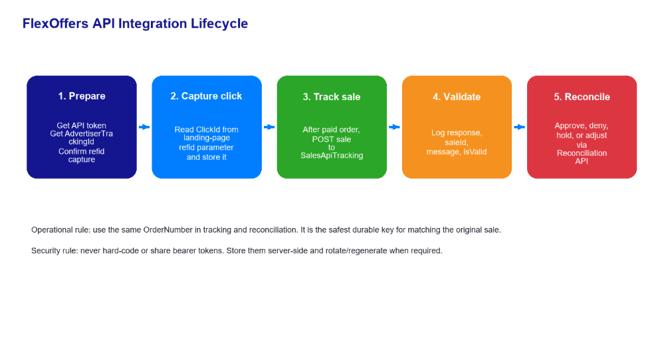 Figure 1. End-to-end API integration lifecycle.
Security note: bearer tokens shown in the advertiser portal are credentials. This guide intentionally uses placeholders such as <API_TOKEN> and does not reproduce portal tokens.
Contents
- Integration overview
- Prerequisites and values to collect
- Authentication and environments
- Sales tracking API implementation
- Sales reconciliation API implementation
- Testing, validation, and go-live checklist
- Troubleshooting and operational controls
- Appendices: reference tables and sample payloads
1. Integration overview
This guide explains how a FlexOffers advertiser can complete a server-side API integration for two connected workflows:
- Sales tracking: send completed orders/conversions from the advertiser backend to FlexOffers using the SalesApiTracking endpoint.
- Sales reconciliation: approve, deny, hold, mark test/pending, or adjust previously tracked sales using the Upload Reconciled Sales endpoint.
- Advertiser portal access with permission to view Conversion Tracking and Reconcile Sales API instructions.
- An API bearer token generated from the advertiser portal. Use the portal Regenerate Token function if a new token is required.
- AdvertiserTrackingId for each applicable program. In the portal, use the program selector shown in the API instructions to retrieve the Advertiser Tracking ID.
- ClickId from FlexOffers traffic. FlexOffers appends this value to the landing page URL as the refid parameter. Capture and persist it.
- OrderNumber generated by the advertiser ecommerce/order system. This must remain stable and unique because reconciliation uses it to locate the sale.
- Order amount before taxes and shipping, plus optional coupon, currency, country, product/SKU data, and commission segmentation data.
- Token storage: store the token in a secrets manager or encrypted server environment variable.
- Token rotation: regenerate and deploy a new token if it is exposed, if staff access changes, or as required by internal policy.
- Logging: log request identifiers and response summaries, but mask tokens and avoid logging full customer/order PII.
- Batching: the sample APIs accept JSON arrays. Send batches sized conservatively so failures are easy to isolate and retry.
The recommended integration pattern is server-to-server. The advertiser captures the FlexOffers click identifier when traffic lands on the site, stores it first-party, sends the sale after order completion, then later reconciles the same order using the original OrderNumber and AdvertiserTrackingId.
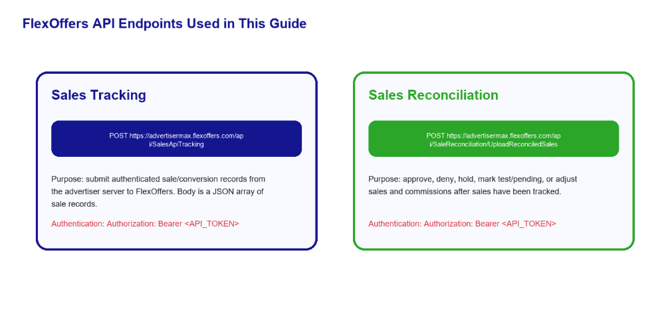
Figure 2. API endpoints used in the integration.
2. Prerequisites and values to collect
|
Value |
Source |
How it is used |
|
API token |
FlexOffers advertiser portal API section |
Sent in the Authorization header for both APIs. |
|
AdvertiserTrackingId |
Program selector in the Conversion Tracking or API Reconciliation instruction panel |
Identifies the advertiser/program for tracking and reconciliation. |
|
ClickId |
Landing page URL refid parameter from FlexOffers traffic |
Required for attributing a tracked sale to the correct click/source. |
|
OrderNumber |
Advertiser order management system |
Required for tracking and later matching the sale during reconciliation. |
|
OrderAmount |
Advertiser checkout/order system |
Required sale amount before tax and shipping. |
|
Status / adjustments |
Advertiser reconciliation process |
Used later to approve, deny, hold, or adjust tracked sales. |
3. Authentication and environments
Both APIs use bearer-token authentication. Send the token only from a secure server-side system. Do not place the token in browser JavaScript, tag managers, client apps, public repositories, support tickets, screenshots, or logs that are widely accessible.
Authorization: Bearer <API_TOKEN>
Content-Type: application/json
4. Sales tracking API implementation
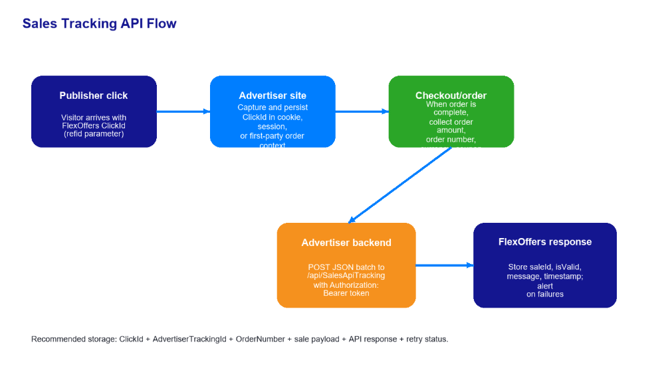
Figure 3. Recommended Sales Tracking API flow.
4.1 Endpoint
POST https://advertisermax.flexoffers.com/api/SalesApiTracking
4.2 Capture ClickId on landing pages
When a visitor arrives from FlexOffers, capture the ClickId from the URL parameter named refid. This value is required by the Sales Tracking API. Persist it in a first-party cookie, server-side session, or customer/order attribution record so it is available at checkout.
Example landing page URL
https://www.advertiser.com/?refid=24.215214.1234567FOF89021871564196739
Persisted value
ClickId = 24.215214.1234567FOF89021871564196739
- If a shopper visits multiple times, follow your attribution policy for which ClickId wins. A common policy is last FlexOffers click before purchase within the allowed attribution window.
- Do not modify or parse the ClickId beyond storing the exact value FlexOffers supplied.
- Tie the final ClickId to the order record at checkout so retries and reconciliation remain deterministic.
- Persist saleId if returned.
- Persist isValid and message for every record, not only the HTTP status code.
- If HTTP 200 is returned but an individual record is invalid, treat that record as failed and route it to correction/retry.
- Make the integration idempotent from your side: do not intentionally submit the same OrderNumber multiple times unless FlexOffers support or documented behavior confirms the duplicate handling expectation.
4.3 Build the sales tracking payload
|
Field |
Required |
Type |
Description |
|
AdvertiserTrackingId |
Yes |
String |
Advertiser Tracking ID from the FlexOffers portal. Example format may resemble a GUID or advertiser tracking value. |
|
ClickId |
Yes |
Number/String value as supplied |
FlexOffers click identifier from the landing page refid parameter. |
|
OrderNumber |
Yes |
Number/String |
Unique advertiser order/conversion reference. Use the same value during reconciliation. |
|
OrderAmount |
Yes |
Number |
Total sale amount before taxes and shipping. |
|
Coupon |
No |
String |
Coupon code used on the order, if any. |
|
CommissionId |
No |
String |
Advanced commission ID, such as NewCustomer or a configured commission segment. |
|
Currency |
No |
String |
ISO currency code, such as USD. |
|
Geo |
No |
String |
Country/geographic code, such as US/USA depending on configured portal guidance. |
|
Items |
No |
Array |
Optional product-level data: SKU, amount, quantity, order coupon, and commission ID. |
|
Items field |
Description |
Example |
|
sku |
Unique product ID or SKU ID. |
SKU_12345 |
|
amount |
Product price. |
75 |
|
quantity |
Number of items. |
1 |
|
order_coupon |
Item/order coupon. |
ABC |
|
commissionid |
Item-level commission ID. |
C101 |
4.4 Sample sales tracking request
[
{
"AdvertiserTrackingId": "<ADVERTISER_TRACKING_ID>",
"ClickId": "<FLEXOFFERS_REFID_FROM_LANDING_PAGE>",
"OrderNumber": "ORDER-100045",
"OrderAmount": "1000",
"Coupon": "",
"CommissionId": "",
"Currency": "USD",
"Geo": "US",
"Items": []
},
{
"AdvertiserTrackingId": "<ADVERTISER_TRACKING_ID>",
"ClickId": "24.123456.1234567FOF89012345678901234",
"OrderNumber": "ORDER-100046",
"OrderAmount": "200",
"Coupon": "10_OFF",
"CommissionId": "NewCustomer",
"Currency": "USD",
"Geo": "US",
"Items": [
{
"sku": "SKU-123456",
"amount": 100,
"quantity": 2,
"order_coupon": "10_OFF",
"commissionid": "C101"
}
]
}
]
4.5 Example cURL request
curl -X POST "https://advertisermax.flexoffers.com/api/SalesApiTracking" \
-H "Authorization: Bearer <API_TOKEN>" \
-H "Content-Type: application/json" \
--data-binary @sales-tracking-payload.json
4.6 Successful response handling
A successful response returns a result array. Store the response with the order so support, reporting validation, and reconciliation can reference it later.
{
"result": [
{
"advertiserTrackingId": "<ADVERTISER_TRACKING_ID>",
"clickId": "24.123456.1234567FOF89012345678901234",
"orderAmount": 200,
"message": "Sales successfully processed.",
"isValid": true,
"saleId": 34275606
}
],
"errorMessage": null,
"timeGenerated": "2025-09-10T17:31:44.8392768Z"
}
5. Sales reconciliation API implementation
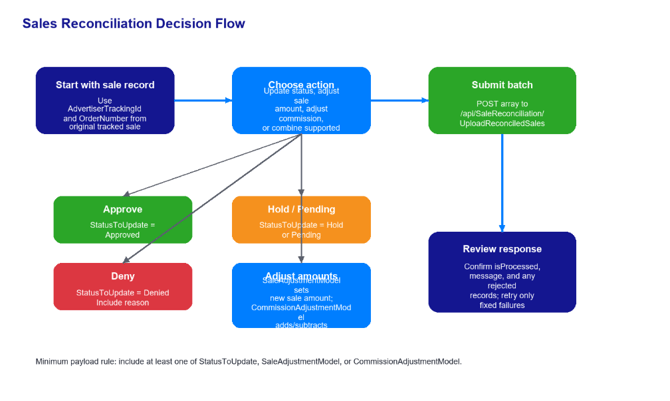
Figure 4. Recommended Sales Reconciliation API decision flow.
5.1 Endpoint
POST https://advertisermax.flexoffers.com/api/SaleReconciliation/UploadReconciledSales
5.2 What reconciliation can update
Use the reconciliation API after sales have been tracked and you need to update their final disposition or values. The API accepts a JSON array of reconciliation records. Each record must identify the sale using AdvertiserTrackingId and OrderNumber, then provide at least one update action.
|
Action |
How to submit it |
Notes |
|
Approve sale |
StatusToUpdate = Approved |
Use when the sale is valid and commission should proceed. |
|
Deny sale |
StatusToUpdate = Denied plus StatusToUpdateReason |
Denied status requires a reason. |
|
Hold sale |
StatusToUpdate = Hold |
Use when more review is needed. |
|
Mark test sale |
StatusToUpdate = DeniedTest |
Use for test/non-payable transactions when appropriate. |
|
Return to pending |
StatusToUpdate = Pending |
Use when the sale should remain pending. |
|
Adjust sale amount |
SaleAdjustmentModel |
SaleAdjustmentAmount is the new sale amount. Include SaleAdjustmentReason and OldSaleAdjustmentAmount. |
|
Adjust commission |
CommissionAdjustmentModel |
CommissionAdjustmentAmount is the amount to add or subtract, e.g., 5 or -5. Include CommissionAdjustmentReason. |
5.3 Reconciliation payload fields
|
Field |
Required |
Type |
Description |
|
AdvertiserTrackingId |
Yes |
string |
Unique advertiser tracking ID from FlexOffers. |
|
OrderNumber |
Yes |
string |
Unique order number associated with the sale. |
|
StatusToUpdate |
Conditional |
string |
One of: Approved, Denied, Hold, DeniedTest, Pending. |
|
StatusToUpdateReason |
Conditional |
string |
Required when StatusToUpdate is Denied; optional otherwise. |
|
SaleAdjustmentModel |
Conditional |
object |
Object containing SaleAdjustmentAmount, SaleAdjustmentReason, and OldSaleAdjustmentAmount. |
|
CommissionAdjustmentModel |
Conditional |
object |
Object containing CommissionAdjustmentAmount and CommissionAdjustmentReason. |
At least one of StatusToUpdate, SaleAdjustmentModel, or CommissionAdjustmentModel is required for each reconciliation record.
5.4 Sample reconciliation requests
Approve a sale:
[
{
"AdvertiserTrackingId": "<ADVERTISER_TRACKING_ID>",
"OrderNumber": "ORDER-100045",
"StatusToUpdate": "Approved",
"StatusToUpdateReason": "Sale approved"
}
]
Deny a sale with a required reason:
[
{
"AdvertiserTrackingId": "<ADVERTISER_TRACKING_ID>",
"OrderNumber": "ORDER-100046",
"StatusToUpdate": "Denied",
"StatusToUpdateReason": "Returned order"
}
]
Adjust sale amount and commission:
[
{
"AdvertiserTrackingId": "<ADVERTISER_TRACKING_ID>",
"OrderNumber": "ORDER-100047",
"SaleAdjustmentModel": {
"SaleAdjustmentAmount": 20,
"SaleAdjustmentReason": "Incorrect amount",
"OldSaleAdjustmentAmount": 10
},
"CommissionAdjustmentModel": {
"CommissionAdjustmentAmount":
"CommissionAdjustmentReason": "Partial return adjustment"
}
}
]
5.5 Example reconciliation response handling
{
"result": {
"title": "Submission completed",
"type": "success",
"message": "API sales reconciliation processed succeeded.",
"records": [
{
"advertiserTrackingId": "<ADVERTISER_TRACKING_ID>",
"orderNumber": "ORDER-100047",
"statusToUpdate": null,
"saleAdjustmentAmount": 20,
"saleAdjustmentReason": "Incorrect amount",
"commissionAdjustmentAmount": null,
"commissionAdjustmentReason": null,
"message": "Sale adjustment amount updated successfully for sale id: 34275603.",
"isProcessed": true
}
]
},
"errorMessage": null,
"timeGenerated": "2025-09-26T09:46:54.1348416Z"
}
- Check result.type, result.message, and every record-level isProcessed value.
- Store the returned message per order for auditability.
- Retry only records that failed after correcting the cause. Avoid blind full-batch retries if some records already processed.
6. Testing, validation, and go-live checklist
6.1 Test plan
- Create or identify a test program and retrieve its AdvertiserTrackingId from the portal.
- Generate a FlexOffers test click so a real ClickId/refid is present on the landing page.
- Confirm the site captures and persists refid through browsing, cart, login, and checkout.
- Submit a small test order to the Sales Tracking API.
- Confirm the API response includes a successful message, isValid = true, and a saleId if returned.
- Confirm the sale appears in the FlexOffers advertiser reporting/reconciliation interface.
- Submit reconciliation updates for sample scenarios: Approved, Denied with reason, Hold, sale adjustment, and commission adjustment.
- Confirm portal values match API submissions and internal order records.
- Document who monitors failures and how unresolved records are escalated.
6.2 Go-live checklist
- Bearer token is stored server-side and masked in logs.
- AdvertiserTrackingId mapping exists for every live program.
- ClickId capture is deployed on all landing pages that receive FlexOffers traffic.
- OrderNumber is stable, unique, and present in both tracking and reconciliation systems.
- Currency, coupon, commission ID, and item payload decisions are documented.
- API requests use retry logic with backoff for transient 5xx/network errors.
- 400/401/403/404 errors route to operational alerting, not infinite retries.
- Response records are stored per order with timestamp and processing status.
- Reconciliation batch generation has review controls before Denied or commission-changing submissions.
- Finance/affiliate team has a report comparing internal orders, tracked sales, and reconciled statuses.
- Require a business reason for every Denied status. The API requires StatusToUpdateReason for Denied records.
- Separate generation of reconciliation files from approval to send them, especially for negative commission adjustments or mass denials.
- Keep a reconciliation audit trail showing who/what generated the update, when it was sent, and the API result.
- Before sending adjustments, calculate expected before/after totals and compare them to the API payload.
7. Troubleshooting and operational controls
|
HTTP / condition |
Meaning from source instructions |
Recommended action |
|
200 |
Successful operation. |
Still inspect record-level messages/isValid/isProcessed. |
|
204 |
URI is valid, but no content is available. |
Confirm payload and date/order criteria; log for review. |
|
400 |
Invalid status value. |
Validate required fields, allowed statuses, JSON shape, and data types. |
|
401 |
Unauthorized; must authenticate with a valid API key. |
Check bearer token, token rotation, and header formatting. |
|
403 |
Request forbidden, most likely because request limit has been reached. |
Slow down, back off, reduce batch frequency/size, then retry later. |
|
404 |
URI invalid or requested resource does not exist; requested format may not be supported. |
Confirm endpoint URL exactly and that the sale/order identifiers exist. |
|
500 |
Something is broken. |
Retry transiently; if persistent, contact support@flexoffers.com with non-sensitive request metadata. |
7.1 Recommended internal data model
|
Column |
Purpose |
|
order_number |
Durable advertiser order key used for tracking and reconciliation. |
|
advertiser_tracking_id |
FlexOffers advertiser/program identifier. |
|
click_id |
FlexOffers refid captured from landing page. |
|
tracking_payload_hash |
Idempotency/audit reference for what was submitted. |
|
tracking_http_status |
HTTP response from SalesApiTracking. |
|
tracking_is_valid |
Record-level FlexOffers result. |
|
sale_id |
FlexOffers sale identifier if returned. |
|
reconciliation_status |
Latest intended status: Approved, Denied, Hold, DeniedTest, Pending. |
|
reconciliation_payload_hash |
Audit reference for reconciliation submission. |
|
reconciliation_is_processed |
Record-level processing result. |
|
last_error_message |
Last API or validation error for support/debugging. |
7.2 Controls for denial and adjustments
8. Appendices: reference payloads 8.1 Minimal sales tracking payload
[
{
"AdvertiserTrackingId": "<ADVERTISER_TRACKING_ID>",
"ClickId": "<CLICK_ID_FROM_REFID>",
"OrderNumber": "<ORDER_NUMBER>",
"OrderAmount": "<ORDER_AMOUNT>",
"Coupon": "",
"CommissionId": "",
"Currency": "USD",
"Geo": "US",
"Items": []
}
]
8.2 Minimal reconciliation payload: status only
[
{
"AdvertiserTrackingId": "<ADVERTISER_TRACKING_ID>",
"OrderNumber": "<ORDER_NUMBER>",
"StatusToUpdate": "Approved",
"StatusToUpdateReason": "Sale approved"
}
]
8.3 Complete reconciliation payload: status and adjustments
[
{
"AdvertiserTrackingId": "<ADVERTISER_TRACKING_ID>",
"OrderNumber": "<ORDER_NUMBER>",
"StatusToUpdate": "Approved",
"StatusToUpdateReason": "Sale approved after review",
"SaleAdjustmentModel": {
"SaleAdjustmentAmount": 20,
"SaleAdjustmentReason": "Incorrect amount",
"OldSaleAdjustmentAmount": 10
},
"CommissionAdjustmentModel": {
"CommissionAdjustmentAmount": 50,
"CommissionAdjustmentReason": "Incorrect commission amount"
}
}
]